How could I add a voice-enabled assistant for my custom home automation app, Louie? Over the last few days I have built an agent harness, which receives user commands, computes the next action in the cloud, and then executes it locally on my iPad. The result looks like this:
Now I can just talk to the app to change the song, for 2¢ apiece. Learn how I built this from the ground up, using frontier models for the reasoning and plain Python for the plumbing (so no LangChain, LiteLLM, LangGraph, or Pydantic AI). The first version is deliberately simple to get something real working end-to-end in the most direct way, which can then be extended and improved in the future.
Tech-Stack & Architecture
While this project was primarily about learning how to build an agent harness, I also wanted to solve a real problem, and nothing is more enticing than having an effect in the physical world beyond the screen. The device with the best API in my house is the Linn Selekt DSM HiFi streamer, which is only available on the local network. Thus the iPad app also acts as a bridge to the streamer, forwarding the tool calls made by the agent.
The client app gets the user’s request using on-device speech-to-text and then opens a WebSocket connection to the agent loop running in a FastAPI server on Modal. The agent can then execute the given tools by sending commands back to the iPad (e.g. search the library, play a song, etc.). This setup is akin to coding agents like Claude Code and Codex, which also have to rely on things being only available on the remote machine and not locally to themselves.
The WebSocket is held open until the agent completes the request, so the backend can easily keep track of the state associated with that conversation. Beyond that the server is stateless right now, so users can not yet refer to things mentioned in earlier requests.
In order to fully understand the data-flow and behavior, this does not employ any libraries for the core run-loop. Furthermore the LLM SDKs themselves (Anthropic and OpenAI for now) are abstracted away, so that we can easily switch the implementation to evaluate each model’s behavior and costs (see below).
The Run Loop
An agent loop is much simpler than the breadth of available libraries would suggest. The whole thing — model call, parallel tool dispatch, cancellation — fits in 30 lines:
SYSTEM_PROMPT = "..."  # one paragraph; see repo for full text


@dataclass
class ToolCallRecord:
    name: str
    input: dict
    is_error: bool


@dataclass
class TurnResult:
    final_text: str
    tool_calls: list[ToolCallRecord]
    messages: list[Message]  # full history for the next turn


async def run_turn(
    adapter: LLMAdapter,
    session: Session,
    utterance: str,
    *,
    history: list[Message] | None = None,
    max_steps: int = 8,
    cancel_token: asyncio.Event | None = None,
) -> TurnResult:
    """Drive one user utterance to a final assistant response."""
    messages = [*(history or []), Message(role="user", content=[TextBlock(text=utterance)])]
    tool_calls: list[ToolCallRecord] = []
    tools = session.schemas()  # iPad sent these on connect

    for _ in range(max_steps):
        if cancel_token and cancel_token.is_set():
            raise TurnCancelled()

        result = await adapter.complete(system=SYSTEM_PROMPT, messages=messages, tools=tools)
        messages.append(result.message)

        # Model is done talking — return the final text to be spoken.
        if result.stop_reason != "tool_use":
            return TurnResult(_join_text(result.message), tool_calls, messages)

        # Model wants tools — dispatch them in parallel (round-trip to iPad)
        tool_uses = [b for b in result.message.content if isinstance(b, ToolUseBlock)]
        results = await asyncio.gather(
            *[session.dispatch_tool(tu.name, tu.input, tu.id) for tu in tool_uses]
        )
        for tu, res in zip(tool_uses, results):
            tool_calls.append(ToolCallRecord(tu.name, tu.input, res.is_error))
        messages.append(Message(role="user", content=list(results)))

    raise AgentLoopError(f"exceeded max_steps={max_steps}")
Each iteration is one model call: either it emits text and we’re done, or it emits tool_use blocks that we dispatch in parallel via asyncio.gather and feed back as the next user message. The Session interface (schemas() + dispatch_tool()) is the seam between the agent and whatever’s actually executing tools — the real iPad over a WebSocket in production, an in-memory fake in the eval suite.
The full code is available on GitHub.
Providing the Tools
As of now, all the tools available to the agent are provided by the client. Upon opening the WebSocket the client sends a list of tools for the agent to use, and later executes them on the agent’s behalf and reports the results back.
The example above internally invokes the search_music, ask_user, and play_music commands to fulfill the user’s request.
While executing these tools on the user’s device is a requirement here, I am not sure if providing them from the client is a future-proof setup. On the one hand it is nice because they are injected at runtime and the agent would thus be able to work with fewer or more tools as provided by the client. On the other hand, because the model treats tools more like the system prompt and not as untrusted user input, it might lead to security issues, especially if the agent gains its own internal tools as well (some of whose data we might not want to leak). So going forward I might move the tool descriptions and parameters to the backend, and the client would only say which agreed-upon commands it supports. There’s probably a lot to learn from MCP trust models, which faced similar issues.
Testing
During development every feature would start with an eval / test case which specified the desired outcome for a request, and which tool invocations would be expected to complete it. This way I could quickly iterate on the system prompt and tool descriptions without using the real device. With 23 eval test cases around the music playback, the basics are well covered, and thus far real-world testing with various inputs has not yielded any gaps.
Each test not only checks the steps and actions, but then also asserts on the final system state to verify that everything led to the desired outcome.
Since the code allows effortless switching between the models, the test evals are run comparatively (currently across Sonnet 4.6 and GPT-5-mini) and results are written to a CSV table for inspection (latency, tokens used, cost estimate, etc.). Sonnet has been reliably faster, whereas GPT-5-mini has been much cheaper at 2x the latency. With the currently limited scope, both models perform equally well overall with the same system prompt and tools and achieve the same results on the happy path.
Only in edge-cases like unclear requests (for example when the input would be “thrill her” instead of “Thriller”) did the two diverge in how they would resolve the ambiguity. But overall their error correction rate was about the same, though interestingly each would be better in different cases. That learning might warrant exploring a fallback model in case the request fails, before returning to the user.
Observability
With so many moving parts and execution split across iPad and then backend, getting insights into the system’s behavior was paramount. Luckily Sentry has good trace and AI support these days, so it was implemented in both the app and backend to allow for end-to-end monitoring.
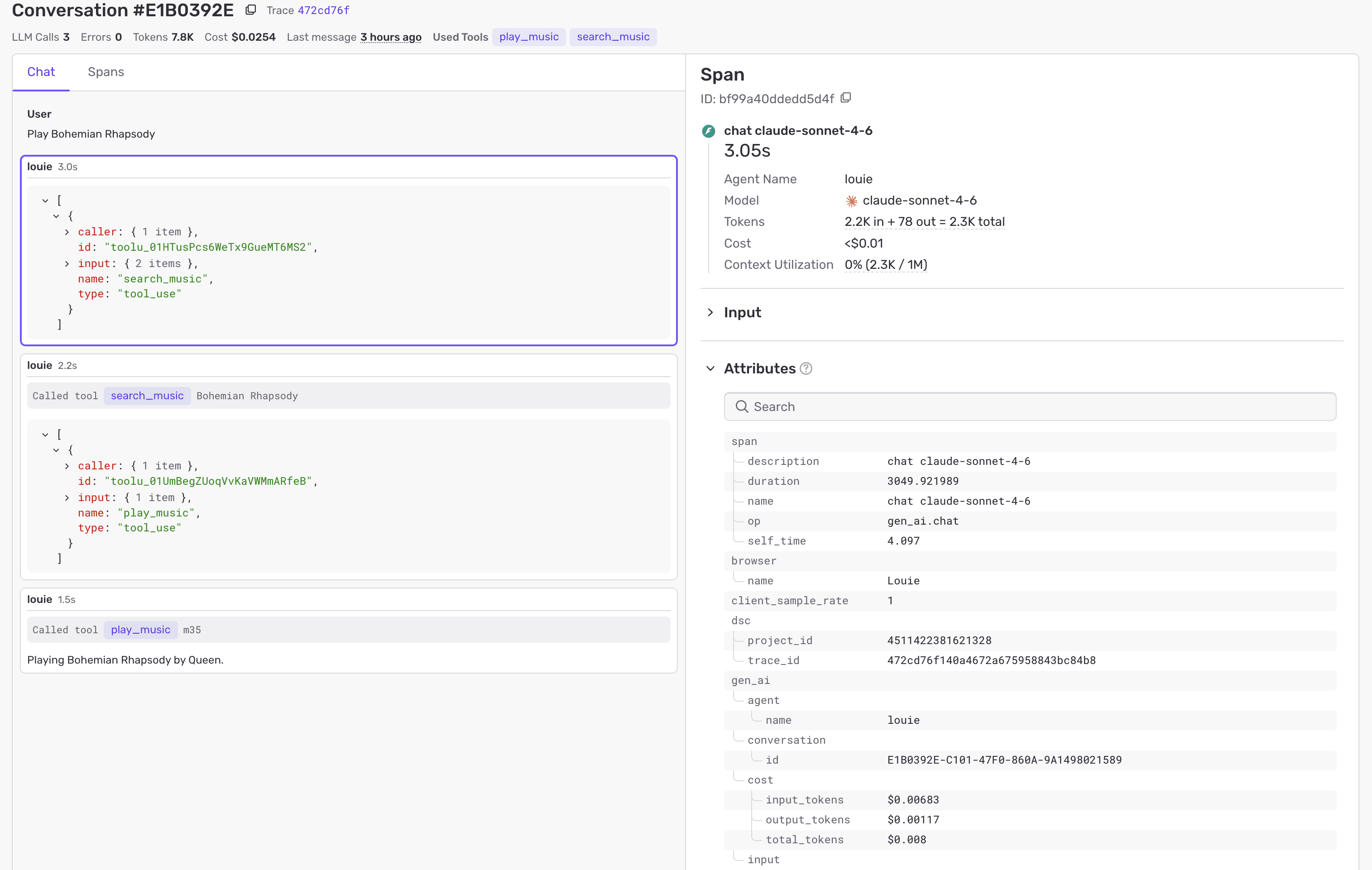
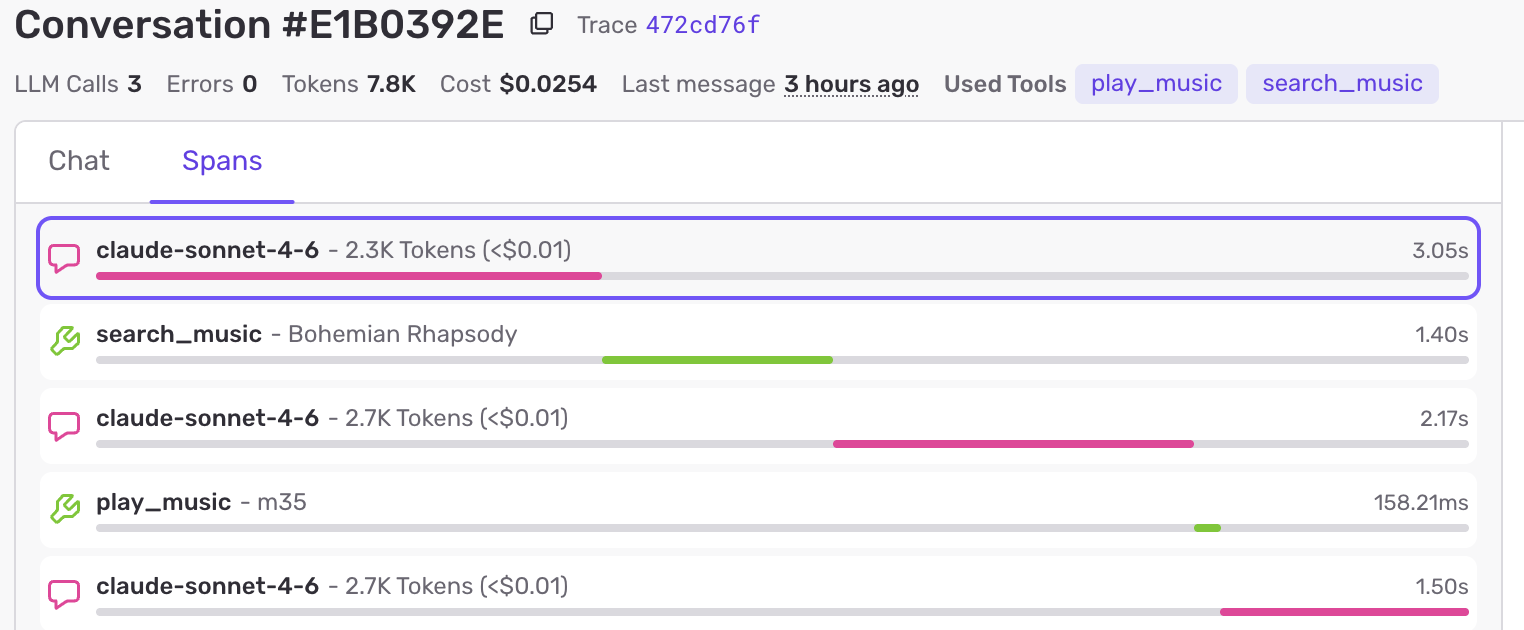
Not only does the tooling allow viewing the overall “time to resolution” for each request, it also captures the entire tool use and model spend per request.
Learnings
When using the real music entity IDs (about 500 bytes) in the search_music result, the LLM was not able to “copy” them correctly into the play_music command, but rather mangled them. So now the system generates local, short IDs per conversation to allow for seamless round-trips.
It was also super interesting how the models behave slightly differently, like coming up with different fixes for misunderstood requests. Here it would definitely make sense to track a “completion score” (validating the resolution and final state) and track that over time to figure out shortcomings and strengths of each and choose the best for a given task.
Follow-ups
While the system is working end-to-end, I noted down a ton of follow-ups. The list below is only focused on the backend/architecture, whereas the UI will also need further changes to feel even more responsive.
- Authentication: Right now the backend is just open for any client to connect to. Since it just supports local tools this is not a huge issue beyond an attacker burning through the limited token allotment, but something to figure out nonetheless. A production version might employ user accounts here, and also piggyback on the observability capabilities to sum up the token spend per user.
- Speed: Currently the model calls are rather slow, and due to the multi-step nature of the problem, this adds up quickly. For a better user-experience I need to at least look into using prompt caches (
cache_control) to be able to continue a conversation faster. Furthermore we might investigate local and smaller models (since world knowledge might not be super relevant for now), and see if they can improve latency without reducing correctness. - Memory: Not being able to follow up on a previous request feels very confusing as a user. At the very least we should keep the conversation open for a minute or so to support immediate follow-ups. Even better if we had access to a larger history so we could also say “Play that album again” once it played through.
- Validation: The deployed model does not yet check the final state after an action. This could easily be extended to match the assertions in tests. E.g. 10 seconds after
play_musicit could runquery_stateand then check both whether the state reflects the invoked actions and whether it looks like the original request has been fulfilled. If not, the exchange might be logged as failed, to be investigated later. - Code execution: Some requests like “Play my most played song” cannot be solved by the model’s language capabilities alone. In order to support those we’d need to allow it to execute arbitrary code (to find the most played song in the entire play history), which should be a straightforward addition using Modal sandboxes.
Summary
Building an agent harness from scratch turned out to be much less magical and complicated than I would have anticipated. Basically it’s just a bunch of plumbing around the core frontier model to connect with my specific application and domain. Especially for such a standard task the defaults were already quite good, and the models would usually do the right thing by default. This already begins with Apple’s on-device speech-to-text model being strong on artists’ names, so we usually get great input. Then the backend takes the right steps to successfully complete the task.
Still, to build this in such a short time without getting distracted by all the adjacent possibilities popping up, it was paramount to stick to the initial plan.
I’m looking forward to investigating the open ideas, and polish this to a product level that I find enjoyable as a consumer.